






Generator Frequently Asked Questions
Q1: My Mobile Link App is not showing the correct status information.
A1: The App may need to be reset. Try the following steps
- Log out of the Mobile Link App.
- Close the App.
- Open the App back up
- Log back in to the App
If this does not fix the issue you will need to un-install the app and re-install
Q2: What is Auxiliary Shutdown Error Code 2800 alarm
A2: The Auxiliary Shutdown/Emergency Stop switch on the backside of the generator has been flipped. This switch is supposed to be pressed in on the “1” position. See picture below. This has been known to be hit for many reasons (i.e. kids ball, garden hose, someone bumping into it, etc…)
To clear the alarm:
-
- Switch the Auxiliary Shutdown/Emergency Stop switch to the “1” position.
- On the generator controller press the “Off” button
- Press the “Enter” button
- Press the “Auto” button
Now the generator should say “Ready to Run”
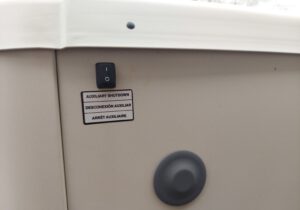
Auxiliary Shutdown/Emergency Stop switch
Q3: My generator is showing disconnected in my Mobile Link App.
A3: It is more than likely the generator has lost connection with the WIFI network. Check out our Connecting the Generator to WIFI Instructions and if you have a TP-Link network Extender see our Setup Instructions. If you are still having troubles after trying these instructions, please call our office for assistance.
Q4: How do I stop mice and chipmunks from going into the corner holes
A4: Generac has two options.
Option 1. 4 pack of base corner plugs

Fascia Plugs
Option 2. Fascia kit
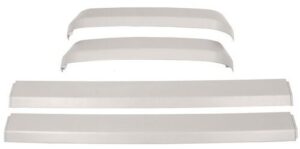
Standby Generator Fascia
Q5: How do I re-connect my generator to the WIFI
Q6: If I change my WIFI router, do I have to re-connect the generator
A6: Yes. If the router, WIFI name, WIFI password is changed, then the generator needs to be re-connected.
(Note, if you have a WIFI network extender, that will have to be re-connected to the router as well.)

Connecting Generator to WIFI Instructions
TP-Link RE-105 Network Extender Setup Instructions
Q7: I am adding a Heat Pump/Mini Split to my house, can I put this on the generator?
A7: Depends. Should call our office to have this assessed. There are a few options here depending on size of Heat Pump/Mini Split and size of the generator.
Q8: What is an Undervoltage alarm
A8: This means the generator is not producing power or power below specifications. This is a shutdown alarm meaning that the controller will shutdown the generator and set the red light on the end of the air-cooled generator. This is to prevent causing damage to the generator or the loads in the home.
The Undervoltage alarm can be caused by many things, a problem with the alternator, dirty slip rings, snow that has blown into the generator, frost on the slip rings. When the weather goes from a warmer temp with some moisture in the air to sudden drop in temperature causing condensation and then frozen condensation or frost.
Q9: What does Inspect Battery Mean
A9: The Inspect Battery is a warning that sets the yellow light on the end of the air-cooled generator. This is a timer in the controller that sets this warning each year to remind you that it is due for service.
Q10: The generator has barely run, why do I need service?
A10:
- The generator will run whether you are home or not and put hours on the machine not known.
- The generator will also build condensation and the moisture will mix with the oil throughout the year causing a milky oil.
- Generac Owners Manual says to service each year or 100hrs of operation if operated above 85degF or below 40degF. If this isn’t followed, it can void warranty.
Q11: My generator has a warranty, doesn’t that cover my maintenance?
A11: No. Maintenance is required to be done to maintain the warranty. If it isn’t maintained, Generac will deny any warranty claims.
Q12: What is Overcrank alarm
A12: This alarm basically means the generator tried to start, but failed to start. Before the generator sets the Overcrank alarm, it will go through a cycle of cranking and pausing. This feature is used to prevent the generator from damaging itself.
- 1st Crank 16sec
- 1st pause 7sec
- 2nd Crank 16sec
- 2nd Pause 7sec
- 3rd Crank 7sec
- 3rd Pause 7sec
- 4th Crank 7sec
- 4th pause 7sec
- 5th Crank 7sec
- 5th Pause 7 sec
- Set the Overcrank alarm